
Just like any other social media platform, Pinterest has a follower feature where Pinterest users will follow your Pinterest content and account. However, there may be an instance where you will need to clean out your followers list for a more positive experience on the platform.
With that said, here is how you can remove Pinterest followers from your account!
Contents
Why should you remove Pinterest followers?
Before we dive into the steps for managing followers, it’s helpful to understand why someone might want to remove a follower on Pinterest. More often than not, there is always a good reason to have your account restricted to someone and you should not feel about it.
- Inactive users: Some users may follow your account but never interact with your Pins. If you’re focused on engagement, having followers who don’t contribute to your growth can feel counterproductive.
- Spam: Occasionally, you may gain followers who are not genuine users. These could be spam accounts or bots that don’t add any real value to your content or interactions.
- Unwanted Attention: If you feel uncomfortable with a particular follower—whether it’s because they’re spamming your Pins or leaving inappropriate comments—you might want to remove them to maintain a positive experience on the platform.
How to Remove Followers on Pinterest
Pinterest has made it easier to remove followers directly from your profile. Here’s a step-by-step guide on how to remove a follower. You can remove your followers on both browser/PC and mobile device.
1. Open Your Pinterest Profile
Log into your Pinterest account. Then, go to your Pinterest profile.
2. Go to Your Followers List
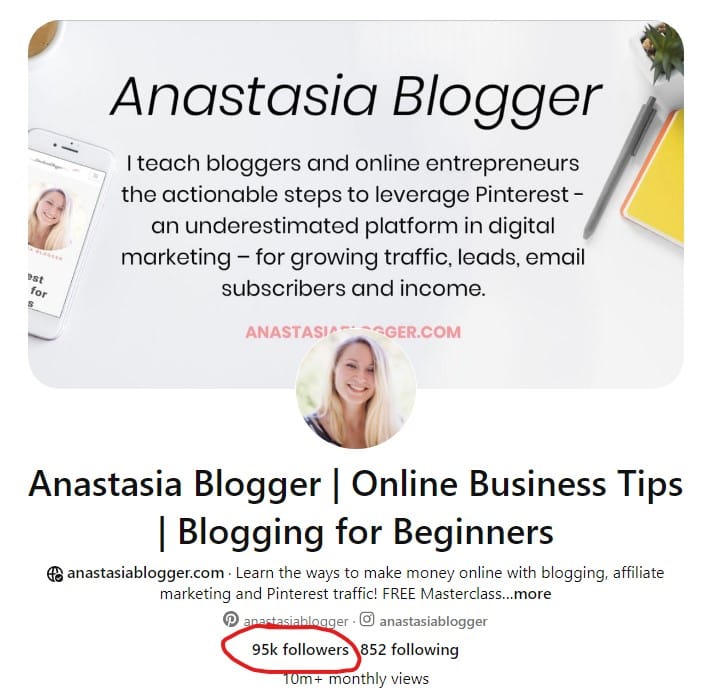
Once on your profile page, click the Followers tab under your profile bio. This is where you can see a list of all the active users who are currently following you.
3. Find the Follower You Want to Remove
Scroll through your followers list to find the users you want to remove.
4. Remove the Follower
Once you find the follower you want to remove, click on the ellipsis icon next to their name or profile photo. This will bring up the option to “Remove” the follower.

The follower will be removed from your list. They will no longer see your Pins on their home feed.
Blocking Someone on Pinterest
While removing a follower simply unfollows them from your account, blocking a user takes it a step further. If you block someone, they will not be able to follow you, see your Pins, or interact with your content in any way.
Blocking is useful if you’re dealing with a spam account, someone who is harassing you, or anyone you’d prefer not to have any access to your profile.
Here is how you can block someone on Pinterest:
Step 1: Go to the User’s Profile
The first step to blocking someone is to find their Pinterest profile. You can do this in several ways:
- Search for their profile: Use the Pinterest search bar at the top of your screen to type in the username of the person you want to block. Once their profile appears in the search results, click on it to visit their page.
- Find them through your followers: If the person you want to block is already following you, you can visit your “Followers” list, find their name, and click on their profile.
Step 2: Click on the Three Dots (…)
Once you’re on the user’s profile page, look for three small dots (…). These dots are located in the upper-right corner of the user’s profile, just above their name and profile picture.
Step 3: Select “Block” from the Menu
After you click the three dots, a drop-down menu will appear with several options. Select the option that says “Block.”

Step 4: Confirm Your Decision
Pinterest will ask you to confirm your decision before blocking the user. You’ll see a message that explains what will happen when you block the person. To proceed, click “Block” again to finalize your choice.
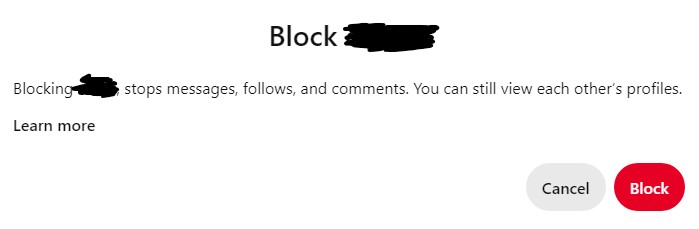
Once you’ve confirmed, the user will be blocked, and they won’t be able to interact with your account anymore.
Ways to Manage Your Pinterest Audience
In addition to removing or blocking followers, there are other ways to manage your audience and control who sees your content on Pinterest.
1. Make Boards Private
If you have specific content that you don’t want certain followers to see, you can create Secret Boards. These boards are only visible to you (and any collaborators you add), so no one else on Pinterest will be able to access them.
How to Create a Secret Board:
- Go to your profile and click on the “+” sign to create a new board.
- Toggle the “Keep this board secret” option before saving.
- Only you and those you invite can see the contents of this board.
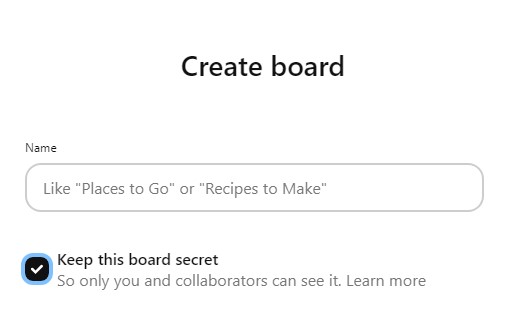
This is a great option if you want to maintain some privacy or you want to make a specific Pinterest board private.
2. Turn Off Comments
If you’re facing unwanted interactions through comments, you can disable comments on specific Pins. This is particularly helpful if you’re dealing with spammy or inappropriate comments.
How to Disable Comments:
- Go to the Pin where you want to turn off comments.
- Click on the three dots to see the option “Edit pin”.
- Scroll down until you see the “Comment Permissions” and toggle it off.

This prevents any followers or Pinterest users from commenting on your Pin. This can help prevent getting negative comments directed at your content as well.
3. Make your Pinterest Account Private
Having a public profile means that anyone can see your Pinterest account and follow you. One of the easy ways to prevent unwanted followers is by making your account private. Here is how you can make private profiles:
- Log in to your Pinterest account
- Click the arrow down icon at the top-right corner to open your menu
- Click Settings
- Click Profile Visibility at the left side of the screen
- Toggle the switch next to Private profile
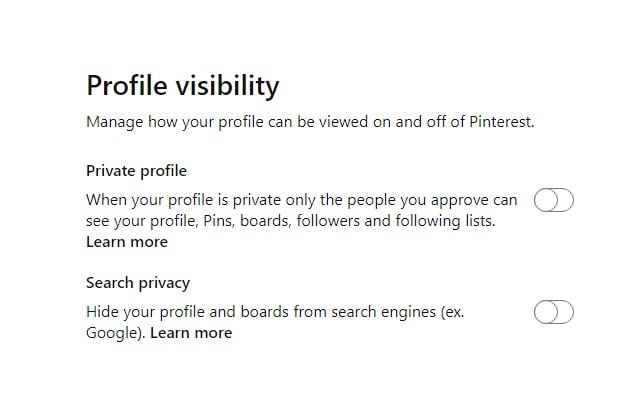
However, do note that you must be at least 16 yrs old to edit your profile visibility. And if you have a business account, you will need to change it back to a personal account to make your profile private.
You can also change your visibility settings on the Pinterest app.
4. Analyze your Pinterest Audience via Pinterest Analytics
Pinterest Analytics is a powerful tool for businesses and creators to track follower growth, engagement, and audience demographics. While you can’t see the names of individual followers, Pinterest Analytics gives you insights into who is engaging with your content.
This can help you better understand your audience and help you decide which followers to keep and which might need to be removed.
How to Access Pinterest Analytics:
- If you have a Pinterest Business account, go to the “Analytics” tab at the top of your profile.
- Review insights such as audience interests, demographics, and engagement rates to understand how your followers interact with your Pins.
By analyzing this data, you can adjust your content strategy to attract more engaged and relevant followers while managing any that are inactive or irrelevant.
Need more tips on Pinterest Analytics? You can read my article about How to Use Pinterest Analytics to understand more about the features!
Bonus: How to Attract New Followers
After you are done cleaning out your follower list, you may now want to attract new followers who are actually from your target audience or those who are like-minded individuals. With that said, here are some tips and the best practices on how to attract new followers on Pinterest so they can hit that follow button on your account:
1. Create High-Quality Pins
Pinterest is a visual search engine platform. This means that one of the most important things you can do to attract followers on Pinterest is to create high quality content. Here’s how to create high-quality Pins:
- Use Bright, High quality Images: Make sure the images you use on your pins are clearly seen, have good lighting, and are visually appealing. Having clear, bright images is the best way to catch Pinterest users’ attention.
- Tall Vertical Pins: Vertical Pinterest Pin perform better on Pinterest because they take up more space in people’s feeds. Pinterest recommends a dimension of 1000×1500 pixels for your Pins.
- Add Text Overlays: Sometimes adding text to your images can make them more engaging. This could be a title, a quote, or a description that explains what the Pin is about.
If you are finding it difficult to create new pins from scratch, then feel free to use my Pinterest Canva Templates that are ready for use!

2. Pin Consistently
To attract followers, it’s important to be consistent. Pinning regularly keeps your account active and helps more people see your content. Here are some tips for staying consistent:
- Pin Daily: Aim to Pin new content every day or at least several times a week. The more active you are, the more chances you have to appear in people’s feeds.
- Schedule Your Pins: If you don’t have time to Pin every day, you can use a scheduling tool like Tailwind to plan your Pins ahead of time.
- Repin Popular Content: It’s not just about creating new Pins; you can also repin content from other Pinterest users. Find Pins that match your interests or niche, and repin them to your boards to keep your profile active and engaging.
3. Use Pinterest SEO
Pinterest is more like a search engine than a social media platform, which means optimizing your Pins for search is crucial. Pinterest SEO (Search Engine Optimization) involves using keywords to help your Pins appear in search results.
- Add Keywords to Your Pin Descriptions: When you create a Pin, make sure to add relevant keywords to the description. This makes it easier for people to find your Pins when they search for related content.
- Use Hashtags: You can add a few relevant hashtags to your Pin descriptions to increase your visibility. Hashtags work similarly to keywords and help your Pins show up in related searches.
- Optimize Your Profile: Include keywords in your Pinterest profile name and bio to make it clear what your account is about. This can help attract followers who are searching for topics in your niche.
If you are looking for more valuable tips on how to effectively optimize your Pinterest account for ranking and traffic, then you can join my Pinterest SEO Traffic Secrets Course for more exclusive info about Pinterest algorithm, Pinterest trends, SEO, and more!


I’m Anastasia and I’m a full-time blogger, online entrepreneur, and Pinterest marketing strategist. I help digital entrepreneurs and bloggers drive targeted traffic from Pinterest either through my online courses or through Pinterest consultancy.